Buy Token Guide
This guide shows you how to buy any meme token (e.g., US - America) using SOL. The process uses a bonding curve — price increases as more people buy.
Step 1: Open Token Page
- From homepage, click any token (e.g., US).
- You’ll land on the token detail page.
Wallet must be connected → See Connect Wallet
Step 2: Go to Buy Panel
- On the right sidebar, click the "Buy" tab (default active).
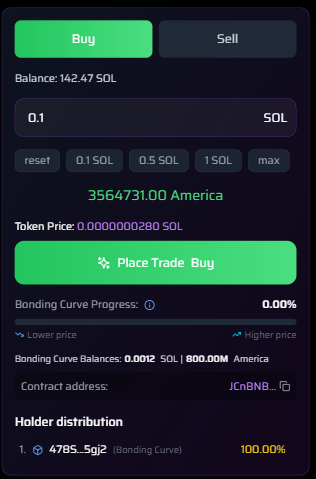
Buy tab with 0.1 SOL entered
Step 3: Enter SOL Amount
Options:
- Type manually in SOL input field
- Use quick presets:
0.1 SOL|0.5 SOL|1 SOL|max
Example: Enter
0.1 SOL
Step 4: Review Trade Summary
After input:
| Field | Example |
|---|---|
| You Receive | 3564731.00 America |
| Token Price | 0.0000000280 SOL |
| Bonding Curve Progress | 0.00% → increases after buy |
| Bonding Curve Balances | `0.0012 SOL |
Exact tokens you’ll get for 0.1 SOL
Step 5: Click "Place Trade Buy"
- Click the green "Place Trade Buy" button.
This triggers your wallet (Phantom, MetaMask, etc.)
Step 6: Confirm in Wallet
- Wallet popup appears
- Network Fee: ~0.00001 SOL
- Click "Confirm"
Transaction completes in ~2 seconds
After Buying: Updates
| Change | Result |
|---|---|
| Bonding Curve Progress | ↑ to 0.45% |
| Bonding Curve Balances | ↑ SOL in curve |
| Your Holdings | Now appear in Holder Distribution |
| Creator % | Reduced (e.g., from 100% → 0.36%) |
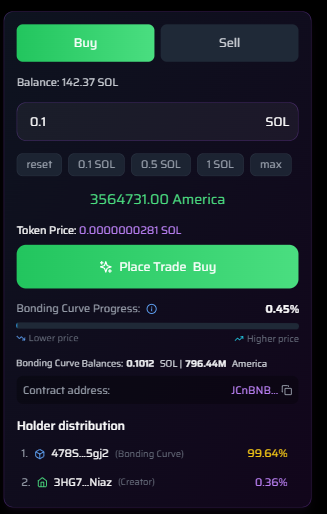
You now own 0.36% of supply
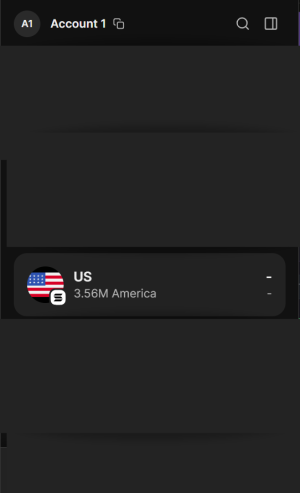
Your Tokens in Wallet
- Open Phantom (or your wallet)
- Go to Tokens tab
- Search for "America" or "US"
- You’ll see:
3.56M America
Buy Summary
| Step | Action |
|---|---|
| 1 | Open token page |
| 2 | Enter SOL amount |
| 3 | Click Place Trade Buy |
| 4 | Confirm in wallet |
| 5 | Receive tokens instantly |
You now own part of the meme!
Watch the price rise as others buy.
Pro Tip: Buy early → lower price via bonding curve.